Drum Set - Drumming App
- 3.8
- Rating
- 10.00M
- Installs
- Free
- Price
 Analysis by App-foxy
I approached Drum Set - Drumming App as a quick musical game rather than a replacement for a physical drum kit, and that distinction shaped my experience from the first tap. It turns the phone into a compact drum surface where I can practice beats, experiment with rhythm, or simply play along when I have a few spare minutes. The idea is easy to understand, but getting something enjoyable from it depends heavily on how I use the limited space of a touchscreen.
This is a free music game from Beat Blend Labs, available for Everyone and compatible with Android 7.0 or later. It has been around since Jul 20, 2011, which helps explain its broad reach: the app has passed 10 million installs and holds a 3.7 average from around 93 thousand ratings. Those figures suggest a familiar, accessible experience rather than a niche tool aimed only at serious drummers.
How the current version feels in everyday use
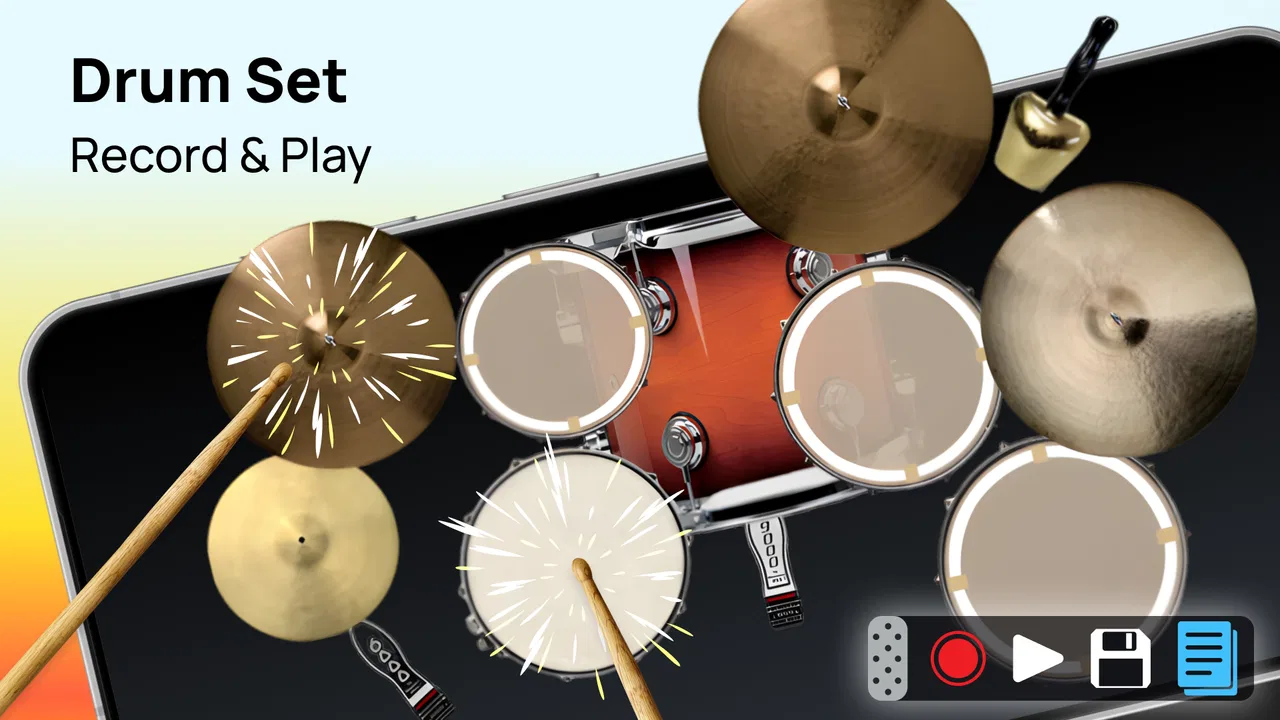
The central appeal is immediate interaction. I can open the app, place my fingers over the virtual kit, and start making a beat without arranging equipment or disturbing anyone with a full-size instrument. That makes it useful for casual rhythm practice, warming up before a lesson, or testing a beat idea that comes to mind while travelling.
You May Also Like

 Blood Strike: 2.5 Anniversary
Blood Strike’s Loadouts Turn Every Drop Into a Tactical Gamble
A close look at Blood Strike’s custom loadouts: how fast access to signature weapons reshapes its battle royale rhythm, rewards preparation, and narrows the gap between fights.

 Pandora - Music & Podcasts
Pandora’s Music Is Easy to Start, but Harder to Recover
Pandora’s strength is its low-effort path from a seed to a station. Its weak spot is how much confidence it asks you to place in connection, setup, and quiet recovery.

 8 Ball Pool
 Is Built on Rivalries, Rematches, and Routine
A close look at the rivalries, rematches, shared routines, and unanswered safety questions that turn a quick pool match into a persistent mobile community.

 Samsung Music
’s Quiet Strength Is Playing What You Already Own
Its reach comes less from spectacle than from dependable access to a personal library. That simplicity is both the app’s strongest retention engine and its ceiling.

 AccuWeather: Weather Radar
AccuWeather Review: A Quick, Clear Forecast for Everyday Decisions
For everyday plans, the best forecast is the one you can understand quickly. AccuWeather makes rain timing, radar, and local conditions easy to act on, with a few trade-offs.

 Hill Climb Racing
Why Hill Climb Racing Still Turns Crashes Into One More Run
A tiny car, a bumpy hill and one more upgrade: Hill Climb Racing keeps resurfacing because its simple chaos makes every near-miss feel personal.
More From Our News Desk



The touchscreen layout also changes the way I think about drumming. On a real kit, the position and rebound of each drum are part of the experience. On a phone, the surface is flat and the response comes from the screen rather than from moving air and vibrating hardware. I therefore found it better for timing exercises and playful pattern building than for judging the feel of an acoustic instrument.
A realistic everyday use is a short evening session with headphones. I can sit on a sofa, tap a simple pulse, and gradually add off-beat hits without setting up a practice pad. It is quiet, portable, and less intimidating than beginning on a complete kit. The trade-off is that the phone can become cramped quickly, especially when I try to play several parts at once.
The game’s strongest quality is its low barrier to entry. Someone who has never touched drums can understand the basic idea almost immediately. I do not need to learn a complicated interface before producing a rhythm. For a child, a curious beginner, or a music fan who wants a small diversion, that simplicity is valuable.
At the same time, I would not choose it as my only serious practice method. A touchscreen cannot reproduce the physical coordination, stick control, foot technique, or dynamic response of a real kit. Even when the app helps me think more clearly about a beat, it does not train every movement that a drummer needs away from the screen.
What the long product history tells me
The release history gives the app an interesting position. Having first appeared in 2011, it has had a long time to remain recognizable to mobile users. The current version is 20240320, so the product is not simply frozen in its earliest form. That version number shows a maintained software line, although it should not be read as proof that the app has become a full studio or professional practice platform.
For existing users, the practical benefit of a current version is continuity. Someone returning to the app after time away can still approach it as a straightforward mobile drum experience instead of learning an entirely different kind of product. I also appreciate that its identity remains focused: it is a game for playing drum beats, not an overloaded music workstation trying to cover recording, mixing, lessons, and live performance all at once.
The evolution is therefore best understood as refinement around the same basic purpose. I would expect the current build to be more relevant to present-day Android use than an untouched early release, but I would keep my expectations measured. The version information confirms a current build, not a guarantee of advanced instruments, detailed lessons, or studio-grade tools.
Who gets the most from the touchscreen format
I think the app works best for three kinds of players. The first is the complete beginner who wants to understand the relationship between a steady pulse and a more active rhythm. The second is the casual musician who wants a portable way to sketch a groove. The third is someone who enjoys music games and wants an instrument-like activity that can be started without preparation.
For beginners, I recommend starting with only a steady beat. I tap the same pulse repeatedly before adding anything decorative. Once that feels consistent, I introduce a second sound at regular intervals, then try placing a hit between the main beats. This approach turns the app into a simple timing exercise instead of a random tapping toy.
A less obvious benefit is that the restricted screen encourages economical playing. On a physical kit, it is easy for a beginner to make a pattern unnecessarily busy. A phone makes me consider which hits are essential because too many simultaneous taps become awkward. That limitation can teach arrangement: a beat often becomes clearer when I remove sounds rather than add them.
There is also a useful workflow for songwriters. I can use the app to test whether a chorus idea feels energetic or whether a verse needs a lighter pulse. I would not treat the result as a finished demo, but it can answer a quick creative question before I open a recording app. That makes the game a sketchbook for rhythm rather than a complete production environment.
Players who already own an electronic kit or use a dedicated drum-learning application may find the experience too basic. Those alternatives usually make better use of larger layouts, physical triggers, structured exercises, or more detailed feedback. If my goal is to improve technique in a measurable way, I would choose the specialized option first and keep this app as a portable supplement.
Small techniques that make sessions more useful
My first practical tip is to treat the phone’s orientation and hand position as part of the exercise. I try to keep my hands relaxed and avoid covering the area I need for the next hit. The screen is less forgiving than a real kit, so a comfortable posture matters more than I initially expected. If I tense my fingers, fast patterns become messy even when the rhythm itself is simple.
My second tip is to separate exploration from practice. During exploration, I tap freely and listen for patterns that feel natural. During practice, I repeat one short rhythm and focus on consistency. Mixing those two goals can be frustrating: improvisation rewards curiosity, while practice rewards repetition. Keeping them separate makes a short session feel more purposeful.
A third useful approach is to build patterns from the end backward. I choose the final hit of a short phrase, then decide what must happen immediately before it. This can help when a beat feels directionless, because the ending gives the pattern a destination. It is a simple compositional trick, but the app’s instant response makes it easy to test several variations quickly.
I also recommend using short sessions instead of forcing long ones. Touchscreen drumming can become tiring because the fingers are repeatedly striking a hard surface without the rebound of a drumhead. A few focused minutes may be more useful than continuing after the timing has started to deteriorate. This is especially important for beginners who might mistake fatigue for lack of musical ability.
Where it differs from common alternatives
Compared with a physical drum kit, this game wins on convenience, noise control, and cost of entry. It is free to start, so I can try the basic experience without buying hardware. It also fits into a pocket, which makes spontaneous practice possible. The physical kit wins decisively on realism, expressive control, coordination, and the satisfaction of playing a complete instrument.
Compared with rhythm games built around fixed songs or timed targets, this app feels more open-ended. I am not relying on a stream of prompts to tell me exactly when to tap; I am using the virtual kit to create a beat myself. That is better for experimentation, but less motivating for someone who prefers levels, scores, or a clear progression path.
Compared with a dedicated drum-learning app, the advantage here is immediacy. I can begin playing without committing to a course. The dedicated lesson app is usually the better choice when I need guided instruction, technique correction, or a planned routine. This game is more suitable when I want a compact rhythm playground and already understand what I am trying to practice.
Compared with a music production workstation, the difference is even larger. A workstation is designed for arranging, recording, editing, and finishing a track. Drum Set - Drumming App is better viewed as a direct playing experience. I can use it to discover a groove, but I should not expect the same control over a complete composition or a polished recording workflow.
What may frustrate returning and new players
The biggest limitation is the physical screen itself. A phone offers less room than a real kit, and the problem becomes more noticeable when I try to play complex combinations. The interface may be perfectly adequate for simple beats, yet the same layout can feel restrictive when I want speed, subtle accents, or independent hand-and-foot coordination.
Another limitation is the gap between tapping and drumming. The app can help me hear and organize a rhythm, but it cannot fully teach the physical habits behind that rhythm. A user expecting realistic practice may feel disappointed if they approach it as a complete simulator. I get better results when I use it alongside clapping, a practice pad, or an actual instrument.
The free entry point is welcome, but in-app purchases range from $0.99 to $99.99 per item. That wide range makes it sensible to review any purchase screen carefully before confirming anything. For a casual player, the free starting point may be enough; for someone considering optional additions, the cost should be weighed against how often the app will really be used.
The 3.7 average also gives me a balanced expectation. It is not a signal to dismiss the game, especially with around 2.4 thousand written reviews and a large install base, but it does suggest that the experience will not satisfy everyone equally. Touch response, layout preferences, expectations about realism, and interest in open-ended play can all affect how a person judges it.
I would advise skipping it if I need structured lessons, detailed performance analysis, realistic pedal control, or a dependable substitute for a rehearsal kit. I would also look elsewhere if I mainly want a score-driven rhythm game with unlockable stages. This app makes more sense for direct, informal beat making than for those specific goals.
What I would watch in the current product direction
Because the current version is 20240320, I would pay attention to whether future updates continue improving the basic playing experience rather than adding complexity for its own sake. The most meaningful progress would be anything that makes touchscreen timing feel clearer, keeps the layout comfortable, and helps beginners understand what they are playing without turning the app into a crowded studio.
I would also watch how well the app serves both sides of its audience: casual players who want instant fun and returning users who want a little more depth. Those goals can conflict. Too many controls could make the first session harder, while too little guidance could leave beginners unsure how to progress. The best direction would preserve the immediate start while offering optional ways to practice more deliberately.
For current users, the sensible approach is to judge the app by its actual role. If it helps you capture a rhythm idea, pass a quiet break, or build confidence before trying a real kit, it is doing something useful. If you are waiting for it to replace hardware or a complete learning system, the mismatch is likely to remain.
My recommendation after using it
I recommend this music game to anyone who wants a free and approachable way to tap out drum patterns on Android. Its long presence, current version, Everyone rating, and broad install base make it easy to understand why it continues to attract casual players. I especially like it as a private rhythm sketchpad: open it, test a pulse, simplify the pattern, and move on with a clearer musical idea.
I would describe Drum Set - Drumming App as a convenient introduction and creative side tool, not a complete drumming education platform. Its best moments come from quick experiments and focused timing practice, while its weakest moments appear when the small screen is asked to imitate the full physical experience of a drum kit.
My final advice is simple: start with the free experience, use short sessions, and decide whether you enjoy the touchscreen response before considering any optional purchase. If you want accessible rhythm play without equipment, it is worth trying. If your priority is technique, measured progress, or professional music creation, choose a dedicated alternative and keep this one for those moments when a beat arrives and you need somewhere immediate to play it.
FAQs for Drum Set - Drumming App
01What are the main features of the Drum Set - Drumming App?
The Drum Set - Drumming App offers a realistic drumming experience with high-quality drum kit sounds, customizable kits, and multiple play modes. Users can enjoy a variety of drum lessons, record their sessions, and share performances. The app is designed to cater to both beginners and advanced drummers, providing a comprehensive drumming experience.
02Is the Drum Set - Drumming App compatible with all devices?
The Drum Set - Drumming App is available for both Android and iOS platforms. It is compatible with most modern smartphones and tablets. However, for the best performance, it is recommended to use devices with updated operating systems and ample RAM to handle the app’s features smoothly.
03Does the app offer any in-app purchases or subscriptions?
Yes, the Drum Set - Drumming App offers in-app purchases and subscription options. Users can unlock additional drum kits, remove ads, and access premium lessons and features. While the basic version is free, these purchases enhance the user experience by providing more customization and learning opportunities.
04Can I use the Drum Set - Drumming App offline?
The Drum Set - Drumming App can be used offline, allowing users to play drums and access previously downloaded lessons without an internet connection. However, certain features, such as downloading new content or sharing performances online, require an active internet connection.
05How does the app cater to different skill levels?
The app is designed to accommodate drummers of all skill levels. Beginners can start with guided lessons and practice exercises, while advanced users can customize their kits and record complex performances. The app’s intuitive interface and progressive difficulty levels help users improve their drumming skills efficiently.
Pros
- Realistic drum sounds and feel.
- Customizable drum kits.
- User-friendly interface.
- Supports multi-touch.
- Good for practice sessions.
Cons
- Ads can be intrusive.
- Limited free features.
- No recording function.
- Requires internet for full access.
- Basic graphics quality.

Drum Set - Drumming App
Gallery